Looking for summer tips for refurbished laptop care that actually work? You’re in the right place.
With the arrival of warmer days comes that familiar mix of sunscreen, seaside escapes, lazy siestas — and the classic dilemma: “Should I bring my laptop along or completely switch off?”
If you’re the type who blends work with sunshine, these 7 smart tips will help you keep your refurbished laptop cool, protected, and running like a dream all summer long. Not only will you extend its lifespan, but you’ll also save money and reduce your environmental footprint.
And no — refurbished doesn’t mean fragile. But a little extra care goes a long way (and yes, it’ll survive the season better than your ice cream 🍦). Ready to avoid the tech meltdowns? Let’s dive in.
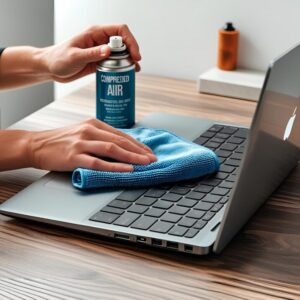 1.Give your fans a break: Clean inside and out
Summer’s unforgiving, and dust-clogged fans can’t push out heat properly. Result? Your machine goes from “power mode” to “mini oven” in record time—hurting performance and lifespan.
Quick Fix: Spend 10 minutes with a soft, lint-free cloth (microfiber is ideal; cotton or linen works too—just steer clear of kitchen roll). Feeling brave? Grab a can of compressed air and blast short puffs into vents and fan intakes. Voilà—your laptop stays your trusty sidekick all summer long, free from thermal shocks.
2.Steer clear of direct sunlight
Your laptop’s not a sun-worshipper. Prolonged exposure to direct UV can overheat the battery, degrade its health, and speed up wear and tear. 🥵
Pro Tip: If you’re turning that terrace into your home office, keep your laptop in the shade or invest in a thermal sleeve that reflects heat. Trust us—your device (and productivity) will thank you.

3.Treat your battery like sunscreen
The battery is one of the most delicate components—and in summer, it’s under extra stress. Leaving it plugged in 24/7 or working constantly on AC power can shorten its lifespan.
Smart Move: Switch on power-saving mode and close heavy apps when you don’t need them. Your battery will run more efficiently, and you’ll avoid that dreaded “burn-out” effect.
4.Cooling pads: The hottest accessory of the season
It might look like something out of a sci-fi film, but those fan-equipped cooling stands really work.
Why You Need One: If you’re glued to your screen for hours, a cooling pad is worth every penny—keeping your laptop frosty and operating at peak performance.
5.Travel in style—and safety
Ditch the half-hearted tote. A padded backpack or sturdy sleeve is essential to shield your laptop from bumps and knocks.
Your laptop is an investment; treat it like one. Every unprotected journey makes a tech-technician weep in silence. Go for a quality case—bonus points if it’s made from recycled materials. Instant eco-chic. 🌱

6.Beware of summer hackers 🚨
Open public Wi-Fi in airports, stations or cafés? Tempting — but risky. They’re a hacker’s playground, especially when you’re using a refurbished laptop that stores sensitive data.
Stay safe: Use a VPN on public networks and make regular backups (weekly is ideal). It’s the digital equivalent of SPF 50.
7.Don’t get caught without updates
Leaving for your vacation without running updates is like forgetting your swim shorts. Nobody wants frozen screens or crashes the moment you hit the beach bar.
Checklist Before You Go: Update your operating system, apps, and antivirus software. Then you can unplug with peace of mind—and return drama-free.
In a nutshell…
These summer tips for refurbished laptop care are more than just smart — they’re essential. With a little maintenance and some preventative habits, your refurbished laptop can thrive in the summer heat.
Stay cool, stay secure, and enjoy your summer without the tech tantrums.🧠😎
Ready for a new summer partner?
Find your perfect match at ECOPC: powerful, sustainable refurbished laptops at refreshingly cool prices, with full warranty and planet-friendly credentials. 🏖️